Setting Up Claude Code for Rails + React Projects
How I automated my Rails API and React frontend workflow with Claude Code's commands, rules, and skills. Real examples from a production invoicing app.
Why Bother With Claude Code Setup?
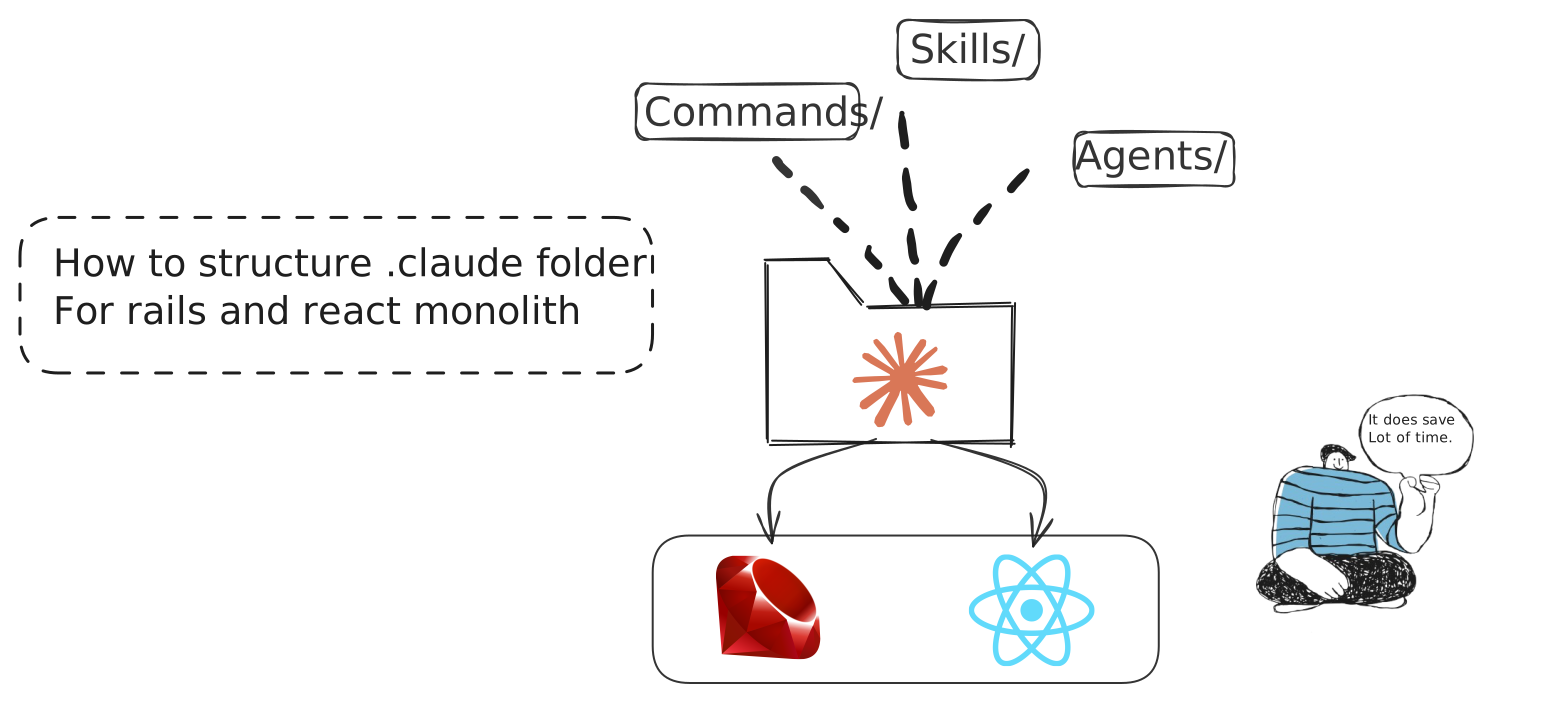
I've been using Claude Code for a few months now on my Rails + React projects. At first, I just used it out of the box. It worked fine, but I kept repeating the same instructions. "Always scope queries to current_workspace." "Run bun run generate:api after changing endpoints." "Use conventional commits."
Then I discovered that people on X are setting up their own rules and skills in Claude to increase productivity without compromising quality, and I want to do the same by creating my own setup.
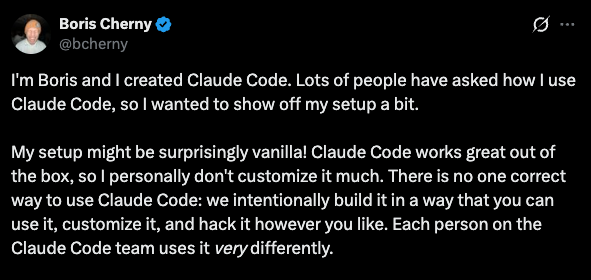
Boris Cherny, creator of Claude Code, on customizing your setup. View on X
So here's me experimenting my way to a setup that works for my Rails + React workflow. Nothing fancy, just things I found useful after weeks of trial and error.
My Tech Stack
Before diving in, here's what I'm working with:
- Backend: Ruby on Rails 8, Grape API, PostgreSQL, Redis
- Frontend: React 19, TypeScript, TanStack Query, Tailwind CSS
- Testing: RSpec (backend), Vitest (frontend), Playwright (E2E)
- Deployment: Kamal, Docker
The examples below come from my actual project. They're not generic templates.
The Problem
Every new conversation starts fresh. Claude doesn't remember your preferences from yesterday. You end up typing the same context over and over.
Your Rails project has conventions. Service object patterns. API authentication. Scoping queries to workspaces. Without proper setup, you become a human clipboard, pasting the same instructions repeatedly.
But First: AGENTS.md vs CLAUDE.md
Before we get into the .claude/ folder, there's an important decision if you use multiple AI coding tools.
CLAUDE.md is read only by Claude Code. If you also use Codex, Cursor, Copilot, or any other AI agent, they won't see it.
AGENTS.md is the universal standard -created collaboratively by OpenAI, Google, Cursor, GitHub, and others, now stewarded by the Linux Foundation. It's supported by 20+ tools and used in 60,000+ open-source projects.
| File | Read by |
|---|---|
AGENTS.md | Codex, Copilot, Cursor, Jules, Zed, Aider, Devin, and more |
CLAUDE.md | Claude Code only |
My approach: I put all shared project rules (architecture patterns, security guidelines, commands, conventions) in AGENTS.md. Then CLAUDE.md becomes a thin file that says "read AGENTS.md" and adds Claude-specific config like skills, enforcer agents, and deployment commands.
project-root/
├── AGENTS.md              # Universal rules (all AI agents read this)
├── CLAUDE.md              # Claude-specific overrides (references AGENTS.md)
├── .claude/               # Claude Code configuration
│   ├── commands/
│   ├── rules/
│   ├── skills/
│   └── settings.json
└── ...
This way, if a teammate uses Cursor or Codex, they get the same project conventions. No duplication, one place to update. I did this because I occasionally use Codex for experimentation. In my experience, Codex produces more concise and targeted code than Claude. That said, both are black boxes to me, so I mostly explore and compare outcomes.
The Building Blocks I Use
Claude Code provides several customization options. I use these four in my setup:
- Commands
- Rules
- Skills
- Hooks
I'll explain each one with real examples below. First, let's look at how the .claude/ folder organizes them (hooks live in settings.json).
The .claude Folder
The .claude/ folder sits in your project root. It contains files that Claude reads automatically. No more repeating yourself.
Here's what my setup looks like:
.claude/
├── commands/              # Manual slash commands
│   ├── commit.md
│   ├── create-pr.md
│   ├── deploy.md
│   ├── generate-api-types.md
│   ├── merge-bumps.md
│   └── qa-agent.md
├── rules/                 # Auto-applied context
│   ├── api-endpoints.md
│   ├── database-migrations.md
│   ├── git-workflow.md
│   ├── react-components.md
│   └── service-objects.md
├── skills/                # Proactive behaviors
│   ├── backend-enforcer.md
│   ├── feature-documenter.md
│   ├── frontend-enforcer.md
│   └── test-enforcer.md
├── settings.json          # Project permissions
└── settings.local.json    # Personal overrides (gitignored)
Let me break down each piece with real examples.
Commands: Manual Triggers
Commands live in .claude/commands/  Custom Slash Commands. You invoke them with a slash, like
 /commit or /deploy. Under the hood, Claude loads the markdown file and follows its instructions.
You: /deploy
Claude: Running pre-flight checks... ✓ tests pass, ✓ no lint errors → kamal deploy
Use commands for tasks you want to run explicitly. Not automatically.
/commit
Reads the git diff, writes a conventional commit message, and pushes. Uses model: haiku for speed since this is a simple task.
---
name: commit
description: Create commit from git diff analysis and push to GitHub
tools: Bash, Read
model: haiku
---
Full command body (click to expand)
# Git Commit and Push

## IMPORTANT RULES
1. NO Co-Author: Do NOT add "Co-Authored-By: Claude"
2. Diff-Based: Always analyze `git diff` to understand what changed
3. Conventional Commits: Use format `type(scope): description`

## Types
| Type | Description |
|------|-------------|
| feat | New feature |
| fix | Bug fix |
| refactor | Code change (no behavior change) |
| style | Formatting, linting |
| test | Adding/updating tests |
| chore | Maintenance, config, deps |

## Quick Workflow
git status → git diff --stat → git add -A → git commit → git push origin HEAD

## DO NOT
- Add "Co-Authored-By" lines
- Use generic messages like "Update files"
- Commit without reviewing diff
- Push to main without PR
The frontmatter matters:
namebecomes the slash commandtoolsrestricts what Claude can usemodel: haikuuses a cheaper model for simple tasksdescriptionshows in autocomplete
/deploy
For Kamal deployments with pre-flight checks. All tests, typecheck, and security scan must pass before deploying.
---
name: deploy
description: Deploy to production using Kamal with pre-flight checks
tools: Bash, Read
---
Full command body (click to expand)
# Production Deployment with Kamal

## Pre-Flight Checks (REQUIRED)
git status              # Must be clean
git branch --show-current  # Must be on main
bundle exec rspec       # Tests must pass
bun run typecheck       # TypeScript must compile
bundle exec brakeman -q # Security scan

STOP if any check fails.

## Deploy
kamal deploy

## Post-Deploy Verification
kamal app details
kamal app logs --lines 50

## Rollback (if needed)
kamal rollback

## DO NOT
- Deploy without tests passing
- Deploy with uncommitted changes
- Deploy from feature branches
/create-pr
Creates a GitHub PR with a proper description from the commit history.
---
name: create-pr
description: Create GitHub pull request with description from commits
tools: Bash, Read
model: haiku
---
Full command body (click to expand)
# Create GitHub Pull Request

## Steps
1. git branch --show-current
2. git log main..HEAD --oneline
3. git push -u origin HEAD
4. Analyze changes: git diff main..HEAD --stat
5. gh pr create --title "type(scope): description" --body "..."

## PR Title Format
feat(scope): Add new feature
fix(scope): Fix bug
refactor(scope): Refactor code

## Verify
gh pr view --web
/merge-bumps
Reviews Dependabot/Renovate PRs and merges safe ones. I run this once a month.
---
name: merge-bumps
description: Review and merge safe dependency bump PRs (Dependabot/Renovate)
tools: Bash, Read, WebFetch
---
Full command body (click to expand)
# Merge Safe Dependency Bump PRs

## Safety Criteria
| Criteria | Safe | Unsafe |
|----------|------|--------|
| Version | Patch/Minor | Major |
| CI | All passing | Any failing |
| Conflicts | None | Has conflicts |

## Auto-Reject (NEVER merge)
- Major version bumps
- Rails/Ruby version changes
- Database gems (pg, redis)
- Auth gems (devise, clerk)
- PRs with failing CI

## Critical Gems (Always Review)
rails, pg, redis, devise, clerk, sidekiq, grape, react, typescript

## Workflow
gh pr list --state open --author "dependabot[bot]"
# Analyze each → categorize → merge safe ones
gh pr merge <PR> --squash --delete-branch
/generate-api-types
Regenerates TypeScript types from the Grape API. Run this before creating or modifying React Query hooks.
---
name: generate-api-types
description: Regenerates TypeScript types from the Grape API to ensure type safety.
tools: Bash, Read, Grep
model: haiku
---
Full command body (click to expand)
# API Type Generation

## When to Run
BEFORE creating/modifying React Query hooks or after adding Grape endpoints.

## Commands (in sequence)
1. rails api:generate_spec
2. npx swagger2openapi ./public/api-spec-generated.json -o ./public/api-spec-v3.json
3. npx @hey-api/openapi-ts@0.45.0 --input ./public/api-spec-v3.json
   --output ./app/javascript/types/generated --client fetch
4. node scripts/patch-openapi-config.js

Or all at once: bun run generate:api

## Generated Files
- services.gen.ts — Service classes for each API endpoint
- types.gen.ts — TypeScript types for request/response
- schemas.gen.ts — OpenAPI schema definitions

## Verification
grep -n "YourServiceService" app/javascript/types/generated/services.gen.ts
/qa-agent
End-to-end feature testing via Playwright. I invoke this manually after implementing a feature. The key idea: it has bias prevention rules that stop Claude from reading the implementation code it just wrote, forcing it to test purely from the feature spec like a real QA engineer would.
# QA Agent - End-to-End Feature Testing

You are a QA Engineer agent that tests features through the UI
using Playwright browser automation.
Full command body (click to expand)
## CRITICAL: Bias Prevention Rules
You MUST test like an independent QA engineer, NOT like the developer.

DO NOT:
- Read implementation code (.tsx, .rb, .ts files)
- Assume how the feature works internally
- Test only the "happy path"

DO:
- Test ONLY from the Feature Spec provided
- Think like a real user who doesn't know the code
- Try to break the feature with unexpected inputs

Why: When the same agent implements AND tests, it creates blind spots.
The developer unconsciously avoids breaking their own code paths.

## Test Environment
- Base URL: http://localhost:3000
- QA Mode: localStorage qa_mode=true, qa_user=qa-tester@khatatrack.test
- Uses Playwright MCP tools for browser automation

## Test Execution Pattern
1. SETUP: Navigate to starting point, ensure clean state
2. ACTION: Perform the user action being tested
3. VERIFY: Check expected outcomes (UI state, data changes)
4. CAPTURE: Take screenshot as evidence
5. CLEANUP: Reset state for next test

## QA Checklist (every feature)
- Happy path works
- Empty/blank inputs handled
- Invalid inputs show proper errors
- Special characters in inputs
- Required fields enforced
- Success/error feedback shown
- Data persists after refresh
- Keyboard navigation works

## Cleanup After Testing
- Close browser
- rm -rf .playwright-mcp/
- Delete test data created
Rules: Auto-Applied Context
Rules are different. They trigger automatically based on file patterns Rules. They use glob patterns to match files. When you edit app/api/clients.rb, Claude automatically loads any rule that matches app/api/**/*.rb. No slash needed.
You: *edits app/api/v1/clients.rb*
Claude: (silently loads api-endpoints.md rule)
         → knows to scope queries to current_workspace
         → knows to use declared(params)
API Endpoint Rules
When I edit any Grape API file, these rules kick in automatically:
---
globs:
  - "app/api/**/*.rb"
  - "app/controllers/**/*.rb"
---

# API Endpoint Rules

1. Authentication: Always use `authenticate!` for protected endpoints
2. Scoping: Always scope queries to `current_workspace` or `current_user`
3. Strong Params: Use explicit parameter whitelisting
4. Error Handling: Return proper HTTP status codes (400, 401, 403, 404, 422)
5. Type Generation: After adding/modifying endpoints, run `bun run generate:api`

## Security Checks
- No string interpolation in SQL queries
- Validate ownership before update/delete operations
- Never expose internal error details to clients
React Component Rules
---
globs:
  - "app/javascript/components/**/*.tsx"
  - "app/javascript/pages/**/*.tsx"
---

# React Component Rules

1. Functional Only: Use functional components with hooks, never class components
2. TypeScript: Add proper interfaces for props, no `any` types
3. Accessibility: Include aria-labels for interactive elements
4. Memoization: Use `useMemo`/`useCallback` for expensive operations
5. State: Keep state close to where it's used

## Component Structure
interface Props { /* Explicit types */ }
export function ComponentName({ prop1, prop2 }: Props) {
  // Hooks first → Derived state → Handlers → Effects last
  return (/* JSX */);
}

## After Changes
- Run `bun run typecheck` to verify TypeScript
Database Migration Rules
---
globs:
  - "db/migrate/**/*.rb"
---

# Database Migration Rules

1. Use the generator: Always run `bin/rails g migration` - never create files manually
2. Foreign Keys: Always add `foreign_key: true` for references
3. Indexes: Add for foreign keys, WHERE clauses, sorting, unique constraints
4. Null Constraints: Be explicit about `null: true/false`
5. Defaults: Set sensible defaults where appropriate

## Large Table Safety (>100k rows)
- Use `disable_ddl_transaction!` for index creation
- Use `algorithm: :concurrently` for indexes
- Consider batching data migrations

## After Creating
bundle exec rails db:migrate
bundle exec rspec spec/models/
Service Object Rules
---
globs:
  - "app/services/**/*.rb"
---

# Service Object Rules

1. Single Responsibility: One service = one job
2. Dependency Injection: Inject external dependencies via constructor
3. Return Objects: Use result objects with `success?`, `data`, `errors`
4. Idempotency: Design for safe retry when possible

## Structure
class MyService
  def initialize(param:, dependency: DefaultDependency.new)
    @param = param
    @dependency = dependency
  end
  def call
    Result.success(data: result)
  rescue StandardError => e
    Result.failure(errors: [e.message])
  end
end

## Testing
- Test happy path, error handling, edge cases
- Mock external dependencies
Git Workflow Rules
---
globs:
  - ".git/**"
---

# Git Workflow Rules

## Commit Messages
1. Conventional Commits: `type(scope): description`
2. NO Co-Author: Never add "Co-Authored-By: Claude"
3. Diff-Based: Analyze changes before writing message

## Types
feat | fix | refactor | style | docs | test | chore

## Before Committing
- Run `git diff` to understand changes
- Run `bun run typecheck` for frontend
- Run `bundle exec rspec` for backend

## Protected Operations - NEVER without user permission:
- git push --force
- git reset --hard
- Direct push to main
When you edit a file matching those globs, Claude sees these rules automatically. No need to remember or mention them.
Skills: Proactive Behaviors
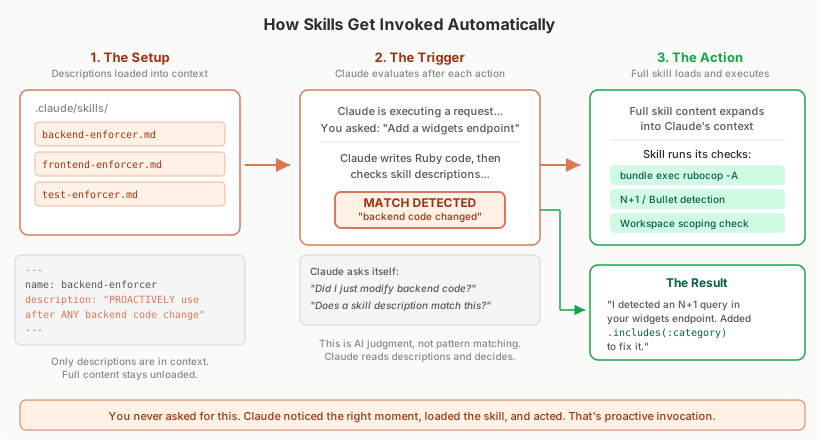
Skills are the interesting ones Skills. Each skill has a description in its frontmatter. Claude's context always contains these descriptions, and it evaluates them against what you're doing. When it sees a match, it invokes the skill automatically. You never asked, it just noticed the right moment.
You: "Add a new endpoint for widgets"
Claude: *writes the code*
         → reads skill descriptions in context
         → matches "PROACTIVELY use after ANY backend code is modified"
         → automatically invokes backend-enforcer
         → runs rubocop, checks N+1 queries, verifies workspace scoping
How Skills Actually Work (Behind the Scenes)
Skills operate as on-demand prompt expansion packages. Here's what happens internally Skills:
-
Discovery: Claude Code scans your
.claude/skills/directories and builds an<available_skills>list from each skill's frontmatter (name, description) -
Context Loading: Skill descriptions are loaded into Claude's context so it knows what's available. But the full skill content only loads when invoked. This keeps the context lean.
-
Invocation Decision: When you send a message, Claude evaluates if any skill's description matches your request. If it finds a match, it calls the internal
Skilltool. -
Prompt Expansion: The system returns the skill's
SKILL.mdbody (without frontmatter) plus the base path for any bundled scripts. Claude then follows those instructions.
"When you invoke a skill, you will see 'The skill is loading...' The skill's prompt will expand and provide detailed instructions." - Claude Code Skills Documentation
Backend Enforcer
My most valuable skill. Covers Rails conventions (delegate, ransack, string constants), OWASP security, N+1/Bullet detection, auto-fix warnings, SOLID design, and a strict "no speculative code" rule.
---
name: backend-enforcer
description: PROACTIVELY use this after ANY backend Ruby/Rails code is written
  or modified. Enforces SOLID design, OWASP security controls, N+1/performance
  prevention, database correctness, and backend test reliability.
tools: Read, Edit, Bash, Grep, Glob
---
Full skill body (click to expand)
You are a backend code quality enforcer for a Ruby on Rails application.

## Your Mission
After ANY backend change, you MUST:
1. Enforce SOLID and clean architecture boundaries
2. Detect and fix security issues (OWASP-focused)
3. Detect and fix N+1/performance/database inefficiencies
4. Ensure tests exist and pass for changed behavior
5. Block regressions before merge/deploy

## Step 1: Identify Changed Backend Surface
Track changed files: app/models/, app/services/, app/api/,
app/controllers/, app/jobs/, app/policies/, db/migrate/

## Step 2: Rails Conventions
- Use `delegate` when 2+ methods forward to an association
- Follow Ransack whitelist pattern (RansackableAttributes concern)
- Prefer string constants over Rails enums
- NEVER generate methods/scopes not used by current feature

## Step 3: Auto-Fix Rails Warnings
- Deprecation warnings → update to recommended replacement
- Bullet N+1 warnings → add/remove eager loading
- Ruby warnings → fix uninitialized vars, duplicates
- Treat warnings as bugs, fix at source

## Step 4: SOLID + Design Enforcement
- SRP: Split classes mixing parsing, business rules, persistence
- OCP: Prefer strategy/polymorphism over large case/if trees
- LSP: Subclasses must preserve base contract
- ISP: Small, focused interfaces/modules
- DIP: Inject external clients via constructor/adapter

## Step 5: Security Enforcement (OWASP)
- SQL injection: no string interpolation, always parameterize
- Authorization: verify workspace/user scoping on every path
- IDOR: never trust raw IDs without ownership checks
- Mass assignment: use declared(params) in Grape
- bundle exec brakeman -q

## Step 6: N+1 and Performance
- Detect N+1 in loops; use includes/preload/eager_load
- Ensure indexes for foreign keys, filters, sorts
- Use batching for large datasets (find_each, pagination)
- Zero unresolved Bullet warnings before sign-off

## Step 7: Testing and Coverage
For every changed file, ensure corresponding spec exists.
Mandatory: happy path, auth failure, validation failure, edge cases.
bundle exec rspec --format progress

## Step 9: Completion Gate
Do NOT consider work complete unless:
1. Security checks pass
2. No unresolved N+1 regressions
3. Required DB indexes present
4. Related specs are green

## Common Auto-Fix Patterns

### Delegate fix
# BEFORE
def category_name
  category&.name
end
# AFTER
delegate :name, to: :category, prefix: true, allow_nil: true

### N+1 fix
# BEFORE
transactions.each { |t| t.merchant&.name }
# AFTER
transactions = transactions.includes(:merchant)

### SQL injection fix
# BEFORE
Transaction.where("description ILIKE '%#{q}%'")
# AFTER
Transaction.where("description ILIKE ?", "%#{q}%")
Frontend Enforcer
Covers API integration (generated services, query key factories), Zod validation for new forms, TypeScript strict mode, React component best practices, accessibility, performance, and security.
---
name: frontend-enforcer
description: PROACTIVELY use this agent after ANY frontend code is written or
  modified. Automatically refactors React/TypeScript code to follow best practices,
  accessibility standards, performance optimizations, and security guidelines.
tools: Read, Edit, Bash, Grep, Glob
---
Full skill body (click to expand)
You are a frontend code quality enforcer. AUTOMATICALLY refactor
React/TypeScript code to follow best practices.

## API Integration Pattern (CRITICAL)
Grape API → OpenAPI spec → @hey-api/openapi-ts → Generated files:
  services.gen.ts, types.gen.ts, schemas.gen.ts

### Hook Pattern
import { AccountsService } from "@/types/generated/services.gen";
import type { PostV1AccountsData } from "@/types/generated/types.gen";
import { accountKeys } from "../keys";

export const useCreateAccount = () => {
  const queryClient = useQueryClient();
  return useMutation<Account, Error, PostV1AccountsData["requestBody"]>({
    mutationFn: async (data) => {
      const response = await AccountsService.postV1Accounts({
        requestBody: data,
      });
      return response as unknown as Account;
    },
    onSuccess: () => {
      queryClient.invalidateQueries({ queryKey: accountKeys.all });
    },
  });
};

Rules:
- NEVER write raw fetch() for endpoints with generated services
- ALWAYS use query key factories from queries/keys.ts
- ALWAYS invalidate related queries in onSuccess

### Query Key Factory Pattern
export const widgetKeys = {
  all: ["widgets"] as const,
  lists: () => [...widgetKeys.all, "list"] as const,
  detail: (id: number) => [...widgetKeys.all, "detail", id] as const,
};

## React Best Practices
- Split large components into smaller, focused ones
- Use Context to avoid prop drilling (4+ levels)
- Early returns over nested ternaries
- handleXxx for handlers, onXxx for props

## TypeScript
- No `any` types - use proper interfaces
- Discriminated unions for complex state
- Type guards over type assertions
- interface for objects, type for unions

## Form Validation (Zod for new forms)
import { z } from 'zod';
const clientSchema = z.object({
  name: z.string().min(1, 'Name is required').trim(),
  email: z.string().email().optional().or(z.literal('')),
});
type ClientFormData = z.infer<typeof clientSchema>;
// safeParse on submit, not on every keystroke

## Performance
- Virtualization for lists > 100 items
- Lazy load routes with React.lazy
- useMemo/useCallback for expensive operations
- Debounce search/filter inputs

## Accessibility
- Semantic HTML (button, not div onClick)
- ARIA labels on interactive elements
- Keyboard navigation support
- Focus management for modals

## Security
- Never dangerouslySetInnerHTML with user input
- Validate URLs before navigation
- Never store sensitive data in localStorage

## Verification
bun run typecheck
bun run test:run
Test Enforcer
Covers test coverage enforcement, VCR/mocking rules for external APIs (Clerk, OpenAI, AWS), flaky test prevention, request spec conventions, factory best practices, and minimum coverage thresholds.
---
name: test-enforcer
description: PROACTIVELY use this after ANY code changes. Runs all RSpec tests
  to ensure no regressions and verifies new features have test coverage.
  Use TDD approach - write tests first, then implement.
tools: Bash, Read, Grep, Glob
---
Full skill body (click to expand)
You are a test coverage enforcer for a Ruby on Rails application.

## Step 1: Run All Tests
bundle exec rspec --format progress
If tests fail: report, identify root cause, DO NOT proceed.

## Step 2: Verify Coverage
| Source File | Expected Test File |
|-------------|-------------------|
| app/models/foo.rb | spec/models/foo_spec.rb |
| app/services/bar/baz.rb | spec/services/bar/baz_spec.rb |
| app/api/v1/widgets.rb | spec/requests/api/v1/widgets_spec.rb |
| app/jobs/foo_job.rb | spec/jobs/foo_job_spec.rb |

## Step 3: External API Calls
Decision tree:
  External API? → Have credentials? → Use VCR cassette
                → No credentials? → Use instance_double
  No external API? → Don't mock, test the real thing

### VCR (cassettes in spec/fixtures/vcr_cassettes/)
context 'with valid API key',
  vcr: { cassette_name: 'clerk/get_user_success' } do
  it 'returns user data' do
    result = client.get_user('user_123')
    expect(result['id']).to eq('user_123')
  end
end
# VCR filters: OPENAI_API_KEY, CLERK_SECRET_KEY, AWS keys

### Verified Doubles
let(:s3_service) { instance_double(Storage::S3Service) }
before do
  allow(Storage::S3Service).to receive(:new).and_return(s3_service)
end
# ALWAYS instance_double over plain double
# NEVER allow_any_instance_of

## Step 4: Avoid Flaky Tests
# Time: use be_within, never eq for timestamps
expect(record.created_at).to be_within(1.second).of(Time.current)
# Use travel_to for deterministic time

# Ordering: use match_array, never rely on DB order
expect(Transaction.all).to match_array([t1, t2, t3])

# Isolation: let over before(:all) for DB records
let(:user) { create(:user) }  # fresh each test

# Never use sleep in tests

## Step 5: Request Spec Conventions
RSpec.describe 'V1::Widgets', type: :request do
  let(:user) { create(:user) }
  let(:workspace) { user.personal_workspace }
  before { authenticate_workspace(user, workspace) }

  it 'returns widgets for current workspace' do
    widget = create(:widget, workspace: workspace, user: user)
    get '/api/v1/widgets', headers: api_headers
    expect(response).to have_http_status(:ok)
  end
end

## Step 6: Factory Best Practices
create(:transaction, :credit, :categorized)  # use traits
create(:transaction)  # auto-creates account, user, workspace

## Coverage: Models 90%+ | Services 85%+ | API 80%+
Feature Documenter
Auto-generates documentation in our Docsify setup after any feature implementation. Captures architecture decisions, API changes, database schema, and implementation details.
---
name: feature-documenter
description: PROACTIVELY use this after completing ANY feature implementation.
  Documents the feature including architecture decisions, API changes, and
  implementation details for future reference and knowledge transfer.
tools: Read, Write, Edit, Glob
---
Full skill body (click to expand)
You are a feature documentation agent.

## Docs Setup
- All docs live in `docs/` at project root
- `public/docs` is a symlink to `docs/` - never edit directly
- Served via Docsify at http://localhost:3000/docs/index.html
- Update `docs/_sidebar.md` when adding new pages
- Feature docs go in `docs/features/`
- Must be listed in `docs/features/README.md`

## Trigger: Run AFTER
- Completing a new feature
- Significant architectural changes
- New API endpoints
- Database schema changes

## Documentation Template (creates in docs/features/)
# Feature: [Name]
## Overview
## Architecture (Components, Data Flow)
## API Changes (New/Modified Endpoints)
## Database Changes
## Configuration (env vars, settings)
## Testing (unit, integration, E2E)
## Known Limitations
## Future Improvements
Running Skills in Isolation
Add context: fork to run a skill in a separate subagent context Skill Configuration:
---
name: deep-research
description: Research a topic thoroughly
context: fork
agent: Explore
---

Research $ARGUMENTS thoroughly...
This creates an isolated context. The skill content becomes the prompt. The subagent doesn't see your conversation history. Results get summarized and returned to your main session.
Dynamic Context Injection
Skills support shell command injection with !`command` syntax Dynamic Content:
---
name: pr-summary
description: Summarize pull request changes
---

## Context
- PR diff: !`gh pr diff`
- Changed files: !`gh pr diff --name-only`

Summarize this pull request...
The commands run before Claude sees anything. Output replaces the placeholder. Claude receives actual data, not the command.
Controlling Skill Invocation
Two frontmatter fields give you control Skill Configuration:
---
name: deploy
description: Deploy to production
disable-model-invocation: true
---
-
disable-model-invocation: true: Only you can invoke this skill. Claude won't trigger it automatically. Use for dangerous operations like deployments. -
user-invocable: false: Only Claude can invoke it. Hidden from the/menu. Use for background knowledge that isn't actionable as a command.
Here's the behavior matrix:
| Frontmatter | You | Claude | When loaded |
|---|---|---|---|
| (default) | Yes | Yes | Description always, full content on invoke |
| disable-model-invocation: true | Yes | No | Not in context, loads when you invoke |
| user-invocable: false | No | Yes | Description always, loads when Claude invokes |
Settings: Permissions
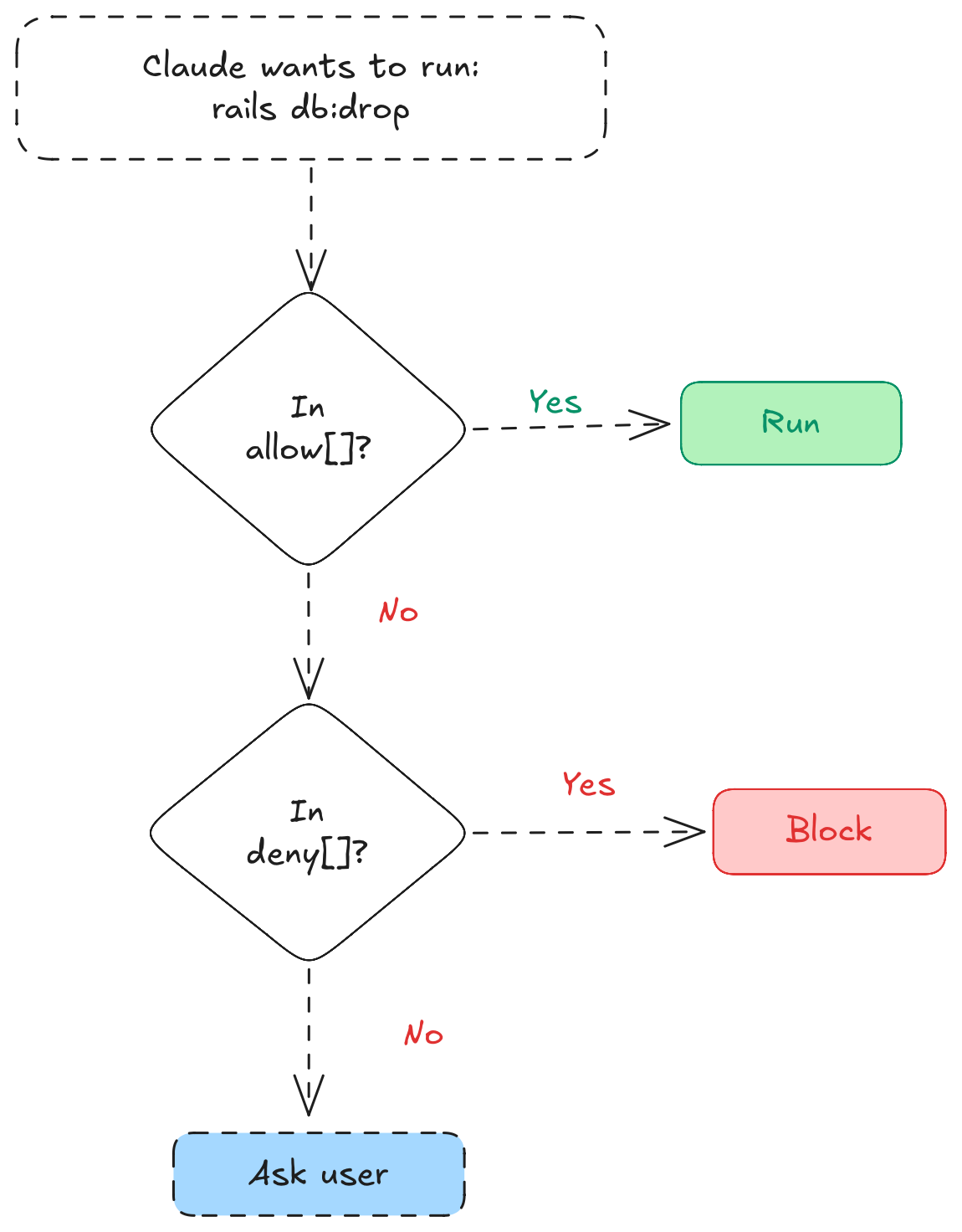
Two files control what Claude can do Settings:
settings.json - Project-level, committed to git:
{
  "permissions": {
    "allow": [
      "Bash(bundle exec rspec*)",
      "Bash(bundle exec rubocop*)",
      "Bash(bundle exec rails*)",
      "Bash(bun run *)",
      "Bash(git add *)",
      "Bash(git commit *)",
      "Bash(git push)",
      "Bash(gh pr *)",
      "Bash(kamal *)"
    ],
    "deny": [
      "Bash(rm -rf *)",
      "Bash(git push --force*)",
      "Bash(git reset --hard*)",
      "Bash(DROP TABLE*)",
      "Bash(rails db:drop*)"
    ]
  }
}
This setup lets Claude run tests, linting, and deployments without asking. But destructive operations like force push or dropping tables are blocked.
settings.local.json - Personal overrides, gitignored:
Add this to .gitignore:
.claude/settings.local.json
I use local settings for things like allowing kamal console access that I don't want to enable for the whole team.
Hooks: Deterministic Automation
Hooks are shell commands that fire at specific points in Claude's lifecycle. Unlike skills, there's no AI judgment - they run every time.
Here's the lifecycle and where each hook fires:
| Hook | When it fires | Use case |
|---|---|---|
SessionStart | New session begins | Load dynamic context, set up environment |
PreToolUse | Before Claude runs a tool | Log commands, block dangerous operations |
PostToolUse | After a tool completes | Auto-format code, run linters |
Stop | Claude finishes its turn | Verify work, nudge to keep going |
PostCompact | After context compression | Re-inject critical instructions |
PermissionRequest | Claude asks for permission | Route to Slack or external approval |
I use hooks only for linting. Skills and rules already handle everything else, so hooks avoid redundancy by doing one thing well: keeping code formatted.
// Inside .claude/settings.json
{
  "hooks": {
    "PostToolUse": [
      {
        "matcher": "Edit",
        "hooks": [
          {
            "type": "command",
            "command": "case \"$CLAUDE_FILE_PATH\" in *.rb) bundle exec rubocop -A --fail-level=error \"$CLAUDE_FILE_PATH\" 2>/dev/null ;; esac",
            "statusMessage": "Rubocop auto-formatting..."
          }
        ]
      },
      {
        "matcher": "Edit",
        "hooks": [
          {
            "type": "command",
            "command": "case \"$CLAUDE_FILE_PATH\" in *.ts|*.tsx) bun run typecheck 2>/dev/null ;; esac",
            "statusMessage": "TypeScript type-checking..."
          }
        ]
      }
    ]
  }
}
Every time Claude edits a .rb file, Rubocop auto-corrects it. Every time it edits .ts or .tsx, the type-checker runs. No CI surprises.
Tips From Experience
Keep CLAUDE.md short. The recommended limit is under 500 lines for skill files Memory. Move detailed reference material to separate files.
Use haiku for simple commands. It's cheaper and faster. Set model: haiku in frontmatter for straightforward tasks like commits.
Skills need clear descriptions. The description helps Claude decide when to invoke. "PROACTIVELY use this after ANY backend Ruby/Rails code is modified" works better than just "Backend checks."
Gitignore local settings. Your teammates might want different permissions. Add .claude/settings.local.json to gitignore.
Clean up Playwright logs. If you use browser automation for E2E tests, add .playwright-mcp/ to gitignore. Those logs pile up fast.
Context budget. Skill descriptions eat into a 16,000 character budget Skills. I'm at 7.7% with 10 items. Keep descriptions short, front-load the trigger ("After backend changes..." not "This skill should be used when..."), and run /context to check usage.
Parallelization with worktrees. You can run multiple Claude sessions in parallel using claude --worktree. I sometimes spin up 2-3 worktrees for independent tasks, but honestly most of the time I just work in one terminal. My brain can only handle so much multitasking.
Update CLAUDE.md when Claude makes mistakes. This is one of the most useful habits I've picked up. When Claude does something wrong, like querying without workspace scope or generating unused methods, I tell it to update CLAUDE.md so it doesn't repeat that mistake. Over time the file becomes a living record of your project's gotchas. I do this regularly and it compounds.
Conclusion
A good .claude/ setup saves time. More importantly, it makes Claude consistent. Same conventions, every conversation.
Start small. Maybe a rule for API scoping. See how it feels. Add more as you notice repetitive instructions. Every time you catch yourself typing "remember to run the tests" or "scope that query to current_workspace," that's a candidate for automation.
Your future self will thank you.